Receipt Printer Cash Drawer Triggering
By Funcron (12/15/2025)
Imagine: electronically triggering a treasure chest to open, a dice roller finally releases its dice, a red light shines on the BBEG waiting in the shadows, or whatever you want — as long as it can be run or inverted from 12–24 VDC. All from within S&D!
Below are a few notes I've consolidated on using the wonderful new addition to Sales & Dungeons (1.0.0-rc33): Signaling the Cash Drawer Port
Things You Will Need
Parts / Tools
A receipt printer with drawer port: RJ11 / RJ12 (“phone line” size, not RJ45 Ethernet)
A sacrificial RJ12/RJ11 cable or two (6-pin or 4-pin depending on your port scheme)
Soldering kit
- OR “Break-out” hardware (screw-terminal integrated ports and parts) and small screwdrivers
A multimeter / voltage meter capable of DC
Whatever medium you want to incorporate an electronic trigger into (example used: a 3D-printed dice tower)
A ¼- or ⅛-watt resistor (4.7KΩ)
ADVANCED SETUP:
- A relay and/or programmable microcontroller
Skills
- Basic small DC voltage knowledge
- How to solder (if soldering)
- Multimeter use
- Imagination & creativity
- ADVANCED SETUP: Ability to program the chosen microcontroller
Cash Drawer Control Port Basics
Here’s what can be said for these cash drawer control ports:
- Each brand has its own proprietary arrangement
- Ultimately, all function the same
- There will be voltage lines for 1 or 2 drawers, depending on the printer
- Most newer models include a signal (switch) line
Important: If you do not have an RJ11/12 port, your printer was used alongside a Serial/USB trigger and does not have this capability.
Sense / Switch Line Notes
The sense/switch line (if used) may require resistance
- 4.7KΩ is common in the POS industry
- It’s recommended to use a resistor during testing, rather than none at all
Common Cash Drawer Mechanism
- An electronic trigger causes a solenoid to receive a burst or break of voltage
- The solenoid magnetically pulls a metal rod
- This rod pushes/pulls the drawer mechanism open
- The sense switch is usually NC (Normally Closed) when the drawer is SHUT
In this case, the signal line needs to be grounded (with or without a resistor, depending on your printer model).
How the Trigger Works with S&D
With the signal line “tricked” into telling the hardware and software that a drawer is attached (and shut):
- Sales & Dungeons sending a cash drawer 1 or 2 signal
- Allows voltage to be pushed on the Voltage / “Drive” line(s)
Where Things Get Weird
Now here’s where you’ll have to experiment.
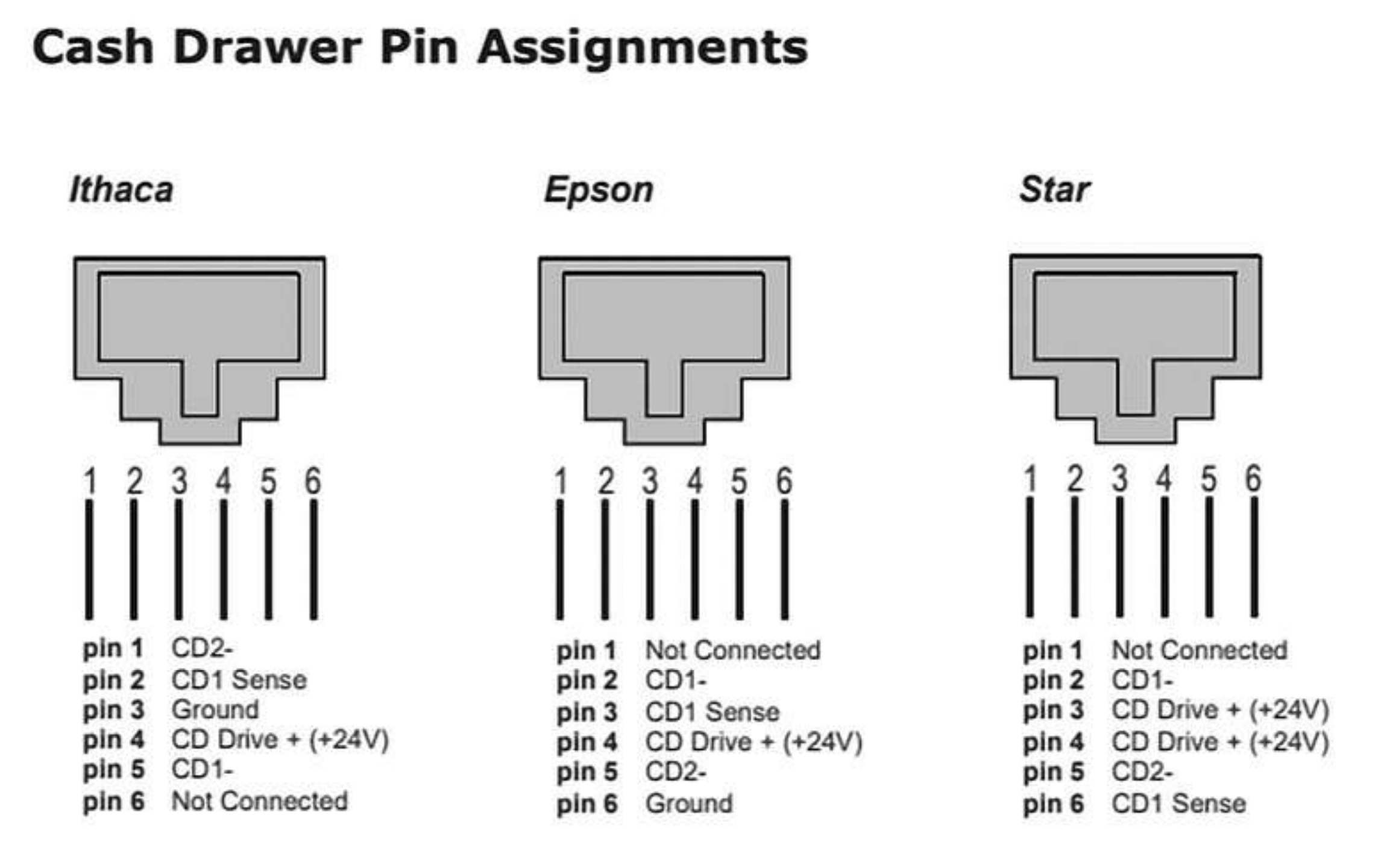
Below are drawer-side pinouts of SOME brands. In the POS industry:
- Brands try to keep printer-to-drawer compatibility
- Sometimes they don’t
- Some still use Serial/USB interfaces
- Some cables rearrange pinouts internally
Cash Drawer Pin Assignments (Drawer Side)
Discovering Your Drawer Trigger Port
Here are the notes on how to discover what kind of drawer trigger port you have. Noting heavily that this is where things can get weird (because these companies what you to buy THEIR proprietary systems, and not use the old, usually still very capable, hardware:
- +12 or +24 VDC may already be available, and sending the software signal turns it off
- +12 or +24 VDC may only be triggered by sending the software signal
- Either case may only be true when the signal switch is OPEN or SHUT
- Pinouts may match printer orientation or be mirrored (pins 1–6 right to left)
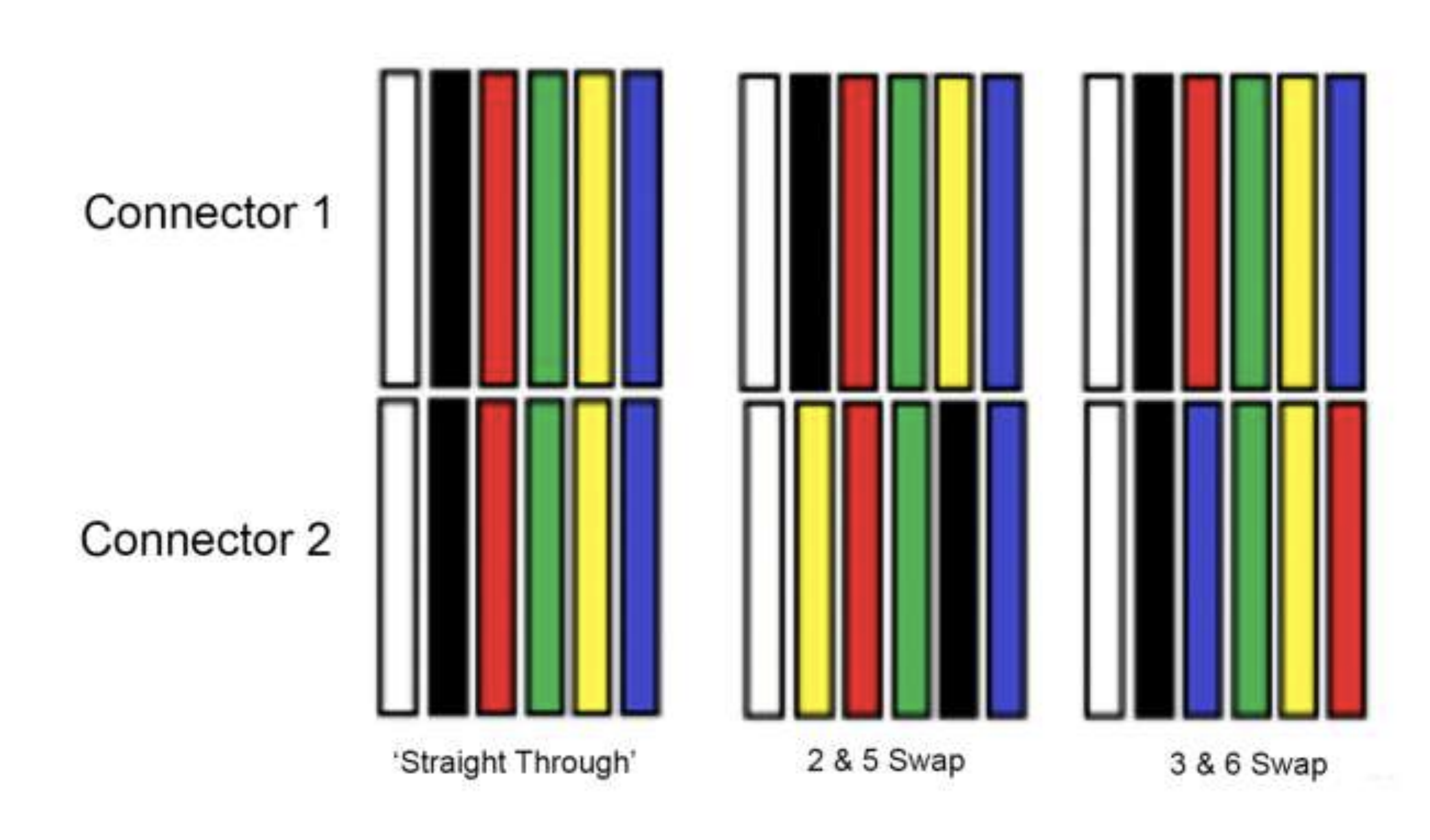
- Brand-specific cables may:
- Swap 2 & 5
- Swap 3 & 6
- Or not swap at all (assume no swaps by default)
- For RJ11 (4-pin):
- Often simpler: voltage ON/OFF via software
- Transitional hardware may still include a signal line
- Assume pins 2–5 (center four) in references
All That, and Now What?
You have a few routes you can take. At its core, you now have a digital light switch.
Simple Use
If your printer provides a straightforward, brief voltage trigger:
- Use a solenoid or fast-acting electro-mechanical actuator
- Incorporate it into any mechanism you want
Universal Setup: Relay
The most flexible solution is a relay switch:
Use the 12/24 VDC signal to trigger a relay
Switch any other device on or off
Example uses:
- Trigger 220VAC to an industrial blender to destroy naughty dice
- Turn on LED lighting
- Activate props, traps, or effects
Advanced Setup
For advanced users with some programming experience:
Connect a microcontroller to:
- The printer’s voltage line or
- A relay
Trigger a program via:
- A button press in Sales & Dungeons
- Or software logic
Advanced idea: Write a program that counts S&D button presses within a time window and triggers different behaviors based on the count.